![New_Centercode_Logo.png]](https://help.centercode.com/hs-fs/hubfs/New_Centercode_Logo.png?height=35&name=New_Centercode_Logo.png)
For a broader overview of how programs and projects relate to each other, see Understanding Programs and Projects.
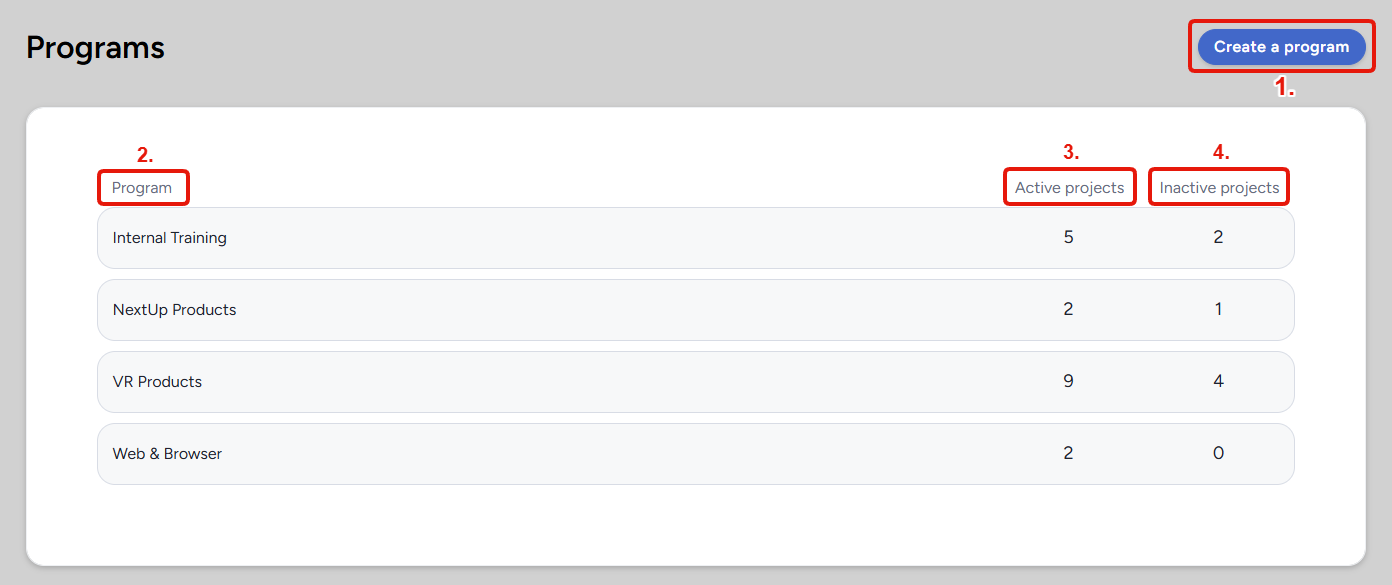
Program List
1. Create a Program: Opens the program creation page, where you name the program and configure any recruitment limiting filters.
2. Program: The name of the program. Click a program row to go to the Projects Management page for that program, showing all projects within it.
3. Active Projects: The number of currently active projects within this program.
4. Inactive Projects: The number of inactive projects within this program. Project active/inactive status is set at the project level. See Archive Project Overview for more detail.
Notes
- Programs are primarily organizational, but they can have recruitment limiting filters assigned to them to control which users can join projects within the program. See the Guide to Recruitment Limiting Filters for more detail.
- Projects can be reassigned to a different program at any time from within the project settings.