![New_Centercode_Logo.png]](https://help.centercode.com/hs-fs/hubfs/New_Centercode_Logo.png?height=35&name=New_Centercode_Logo.png)
How It Works
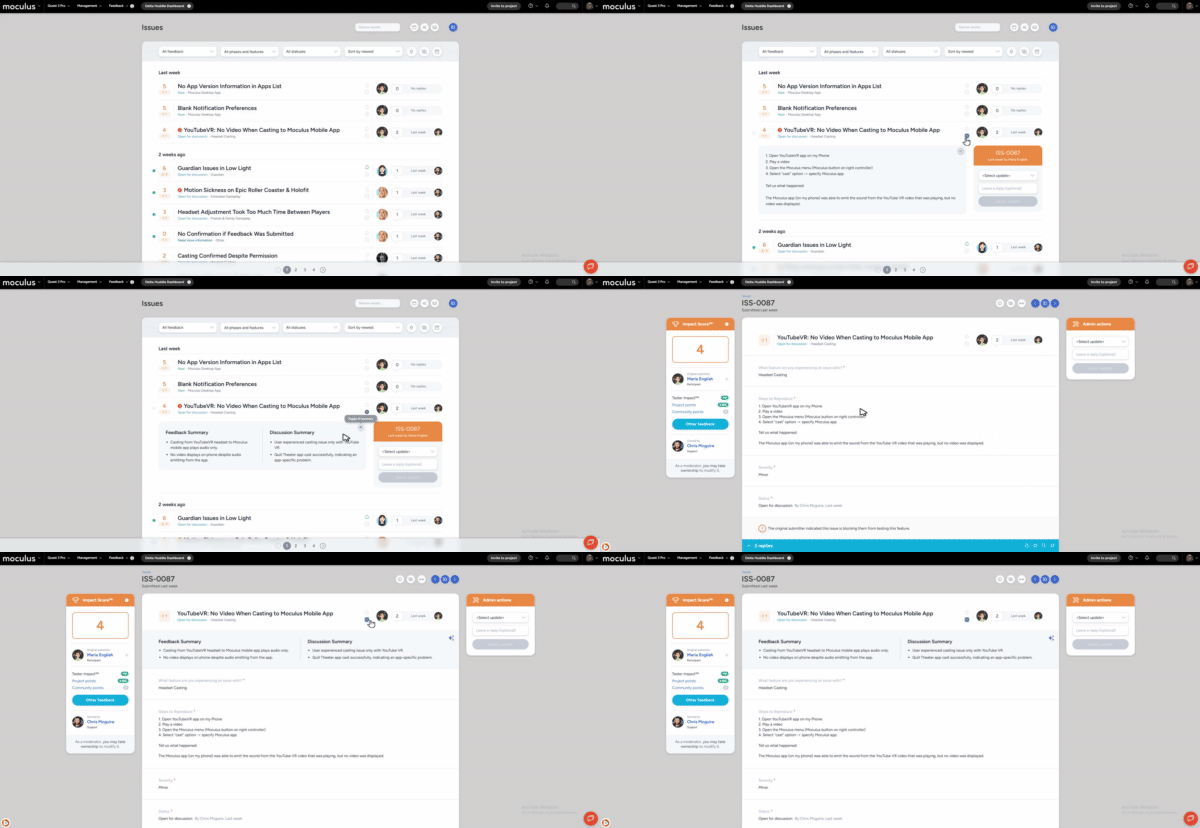
To view AI summaries for a feedback ticket:
- Locate the feedback card - either by opening a specific ticket or expanding a card from the feedback list
- (if viewing from the feedback list) Click the Toggle AI summary button (the chevron icon to the left of the submitter avatar) in the ticket header
- The summary card expands to reveal the Feedback Summary and, if replies exist, the Discussion Summary side by side
Enabling AI Feedback Summaries
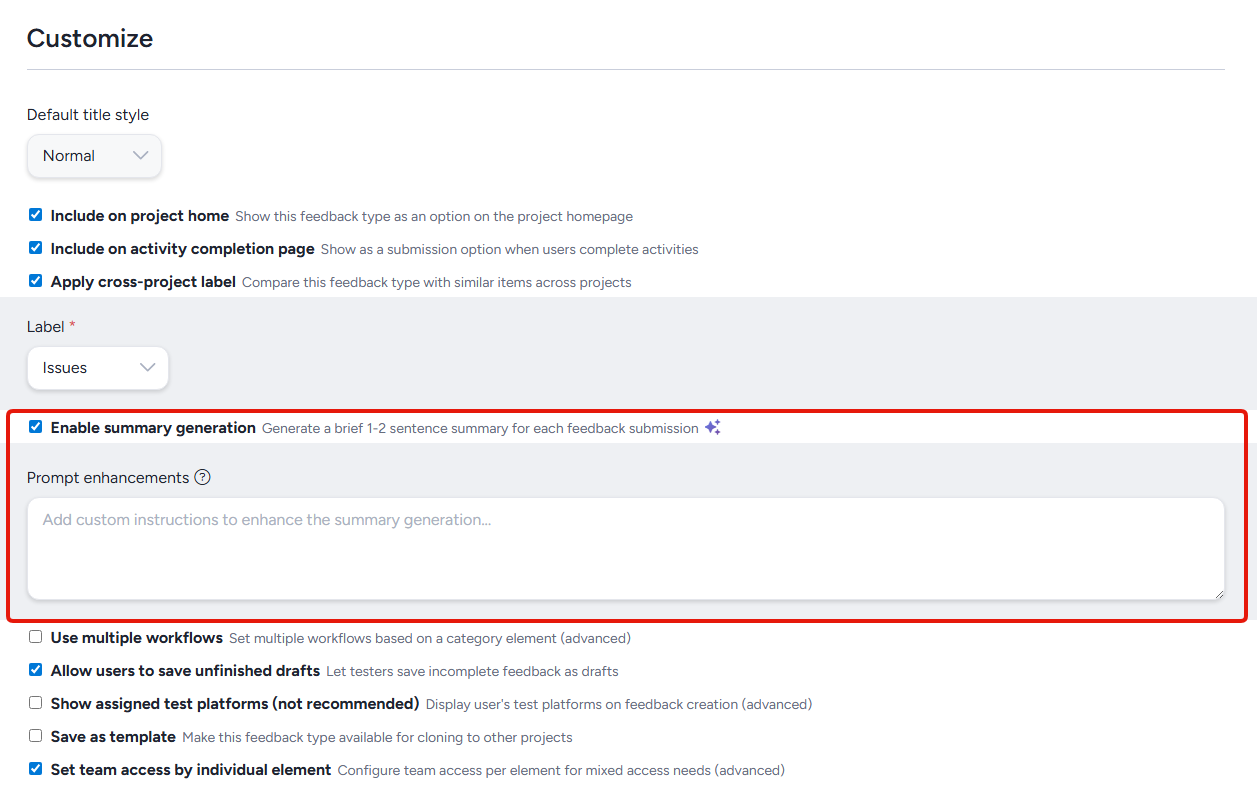
AI feedback summaries are enabled on a per feedback type basis, and can be enabled in the Feedback properties menu when editing a feedback type.
To access the AI feedback summaries feature go to Management>Project configuration>Feedback types>Modify>Feedback properties
Note:
AI features enabled at the community level via the Centercode AI settings page
Custom Summary Instructions
Admins can add custom instructions per feedback type to supplement the base summary prompt. This allows you to tailor AI output to the specific context of each feedback type - for example, directing the AI to focus on reproduction steps for a bug report type, or emphasize sentiment for an ideas type.
Accessing AI Summaries
The feedback card interface that surfaces AI Summaries is available in two places:
Feedback list: Expand any feedback card in the list view, then click the Toggle AI summary button to reveal the summary card. Both the Feedback Summary and Discussion Summary appear side by side, allowing you to assess submission content and discussion activity across multiple tickets without leaving the list.
Feedback detail view: When viewing an individual feedback ticket, the same feedback card interface is available just below the ticket header. Just expand the card to see the AI summary.
Summary Types
Feedback Summary: Generated automatically when a feedback ticket is submitted. It provides a concise bulleted overview of the submission's content so admins can understand what was reported without reading the full form. Feedback Summaries are generated from text-based fields including text entries, choices, ratings, and dates - file attachments and internal notes are not included.
Discussion Summary: Generated automatically when the first reply is posted to a feedback ticket, and regenerates each time a new reply is added. Discussion Summaries are contextually aware - the AI receives the Feedback Summary as input, so the discussion summary is grounded in the original submission rather than evaluated in isolation. When regeneration is triggered, the previous summary is immediately archived so stale content is never shown while the new one is being generated.
Requirements
- Moderate Feedback permission
- AI features enabled at the community level via the Centercode AI settings page
- AI Feedback Summaries enabled for the specific feedback type
Notes
- Summaries are generated from text-based fields only. File attachments and internal notes are excluded.
- Discussion Summaries regenerate when new replies are posted, but not when existing replies are edited or deleted. If a reply is modified after a summary is generated, the summary may not reflect those changes until a new reply is added.
- For more information on controlling which AI features are active for your community, see the Centercode AI Settings Overview.